10 Christmas Paper Mockup Canva Templates for Festive Designs
If you create digital products, you know the holiday season brings both opportunity and pressure. Everyone wants Christmas-themed content—cards, planners, social media graphics, printables—and they want them fast. That’s where the 10 Christmas Paper Mockup Canva templates come in. This isn’t just another set of mockups. It’s a practical, time-saving resource designed to help you showcase your work with a polished, professional finish. Whether you’re a solo creator or part of a marketing team, having the right presentation tools can make the difference between a sale and a scroll-past.
What Makes This Christmas Paper Mockup Set Stand Out
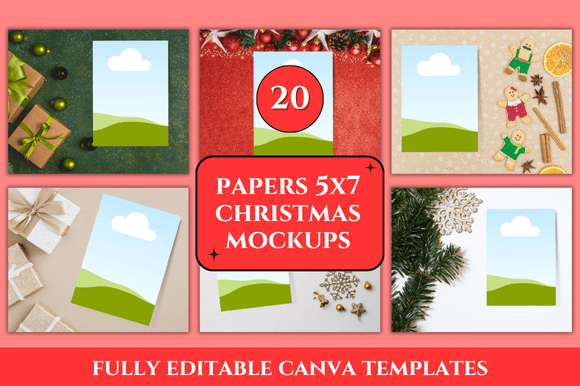
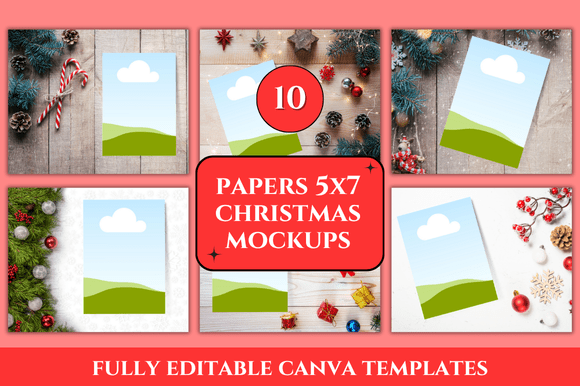
The Christmas Paper Mockup for Canva includes ten distinct templates, each sized at 3000 x 2400 pixels. That resolution gives you plenty of room for crisp, clear presentations across websites, social platforms, and print catalogs. Because these are Canva-based mockups, you don’t need advanced design software or technical skills. Everything is customizable directly in Canva’s drag-and-drop interface.
One of the notable qualities here is the clean, uncluttered aesthetic. The mockups focus on the paper product itself—whether it’s a holiday card, a printable planner page, or a gift tag—without distracting backgrounds or overly busy props. This makes it easier for your customers to see exactly what they’re buying. The templates also come with bonus freebies, which adds extra value without extra cost. For creators who sell on Etsy, Gumroad, or their own site, these extras can be a nice way to sweeten a listing or reward repeat buyers.
Practical Applications Across Different Settings
These mockups are versatile enough to serve multiple audiences and use cases. Here’s how different professionals might put them to work:
- E-commerce sellers and product creators—If you sell digital planners, sticker sheets, or printable Christmas cards, the 10 Christmas Paper Mockup Canva templates let you showcase each item in a realistic, appealing way. Upload your design, adjust the mockup in Canva, and you’ve got a product photo ready in minutes.
- Social media marketers and content creators—Holiday content needs to feel seasonal but not chaotic. These mockups offer a consistent, branded look for Instagram posts, Pinterest pins, and Facebook ads. You can swap out products quickly and maintain a cohesive feed.
- Print-on-demand and stationery designers—Testing a new holiday card design or notebook cover? Use the mockups to see how it looks in a real-world context before sending it to print. This saves time and reduces costly mistakes.
- Bloggers and educators—Need to create a festive workbook, activity sheet, or holiday guide? The Christmas Paper Mockup for Canva gives you a ready-made frame to present your resource professionally. It’s also useful for email opt-in freebies or course previews.
- Freelancers and entrepreneurs—When you’re pitching a holiday campaign or portfolio piece, polished mockups communicate credibility. Clients appreciate seeing how your designs will look in a finished state, and these templates help you deliver that without a full photoshoot.
How These Mockups Improve Usability and Efficiency
Time is the one resource you can’t buy more of, especially during Q4. The 10 Christmas Paper Mockup Canva templates are built to reduce friction in your workflow. Instead of building a presentation from scratch, you open a template, drop in your design, and export. The file dimensions are already optimized for common platforms, so you won’t waste time resizing or cropping afterward.
Another efficiency gain comes from consistency. When all your product shots use the same mockup style, your store or portfolio looks curated rather than cobbled together. This visual coherence supports brand recognition. A visitor who sees your designs in one mockup style will more easily identify your work on another platform.
Real-World Use Cases and Examples
Let me walk through a few scenarios where these mockups genuinely shine.
Example one: You run a small Etsy shop selling Christmas planner inserts. Instead of photographing each insert on a desk with inconsistent lighting, you use the Christmas Paper Mockup for Canva to create uniform product images. You simply upload your planner page design, adjust the placement within the mockup, and export. The result is a set of clean, professional listing photos that convert better than unaided shots.
Example two: A marketing freelancer is pitching a holiday email campaign to a client. Rather than sending flat screenshots of the email design, they use one of the paper mockups to present it as a printed card. This simple visual shift makes the idea feel more tangible and memorable. The client can immediately envision the design in the real world.
Example three: A teacher creates a set of Christmas-themed math worksheets for students. They use the mockup to create a promotional image for their Teachers Pay Teachers listing. The mockup gives the product instant credibility and helps it stand out among hundreds of similar resources.
Benefits for Branding and Engagement
The visual presentation of your product communicates quality before anyone reads a word. These mockups help you establish a professional brand atmosphere without needing a photography studio. The 3000 x 2400 px resolution works well for both web and print use, so you can repurpose the same image across multiple channels.
Engagement also gets a boost. Posts with high-quality mockup images tend to perform better on social media because they look polished and intentional. The 10 Christmas Paper Mockup Canva templates give your audience a clear, attractive view of what you’re offering, which encourages clicks and saves.
Practical Considerations Before You Download
Before you go all in on any mockup set, it helps to consider a few things that will affect your experience. Here are some recommendations based on working with similar resources:
- Check Canva compatibility. These templates are designed specifically for Canva, so make sure you have access to Canva’s free or pro version. Most features work in the free tier, but some elements may require a pro account.
- Plan your color palette. Because the mockups use Christmas paper textures, choose product colors that complement the festive backdrop. Neutral or metallic tones often work best, but bright colors can also pop nicely.
- Think about your product dimensions. The mockup size is 3000 x 2400 px. If your product is a different shape, you may need to crop or adjust placement slightly. This is usually a quick process in Canva.
- Use the bonus freebies strategically. The bonus items included with the Christmas Paper Mockup for Canva can be used as additional marketing assets—social media tiles, email headers, or blog graphics. Don’t overlook them.
- Test before you launch. Always export a sample and view it on different devices to make sure the resolution and colors look right. This prevents issues during a campaign or product launch.
Why This Template Set Works for Busy Creators
The core value of the 10 Christmas Paper Mockup Canva templates is that they remove obstacles between you and a finished product. You don’t need to learn a new tool, hire a photographer, or spend hours setting up props. You just need your design and a few minutes in Canva. That efficiency is especially valuable if you’re juggling multiple projects, clients, or deadlines during the holiday season.
At the same time, the aesthetic quality doesn’t suffer. Clean lines, realistic paper textures, and thoughtful composition mean your work looks like it belongs in a store or portfolio, not a draft folder. That’s the balance that experienced creators look for: speed without sacrificing presentation.
If you’re in the middle of planning your holiday content or product lineup, having a reliable mockup set on hand is one of those small investments that pays for itself in saved time and better results. The Christmas Paper Mockup for Canva delivers exactly that—a straightforward, professional way to showcase your Christmas designs without the usual hassle.